
TL;DR: Creating a chatbot with APIs involves choosing an AI provider and building the chatbot workflow. You also need to integrate the chatbot with applications, deploy it on a hosting platform, and monitor API usage and performance.
An AI chatbot is a software application that understands user messages and responds in a conversational format. These chatbots use artificial intelligence and APIs to process requests, generate responses, and interact with users in real time. They are commonly used on websites, in customer support systems, and in business applications.
In this article, you will learn the basics of creating a chatbot using APIs. You will also understand how to integrate AI features and deploy the chatbot for practical use.
Building an AI Chatbot
You can build an AI chatbot by connecting your application to an AI model through an API. APIs allow your chatbot to send user messages to an AI service and receive generated responses in real time.
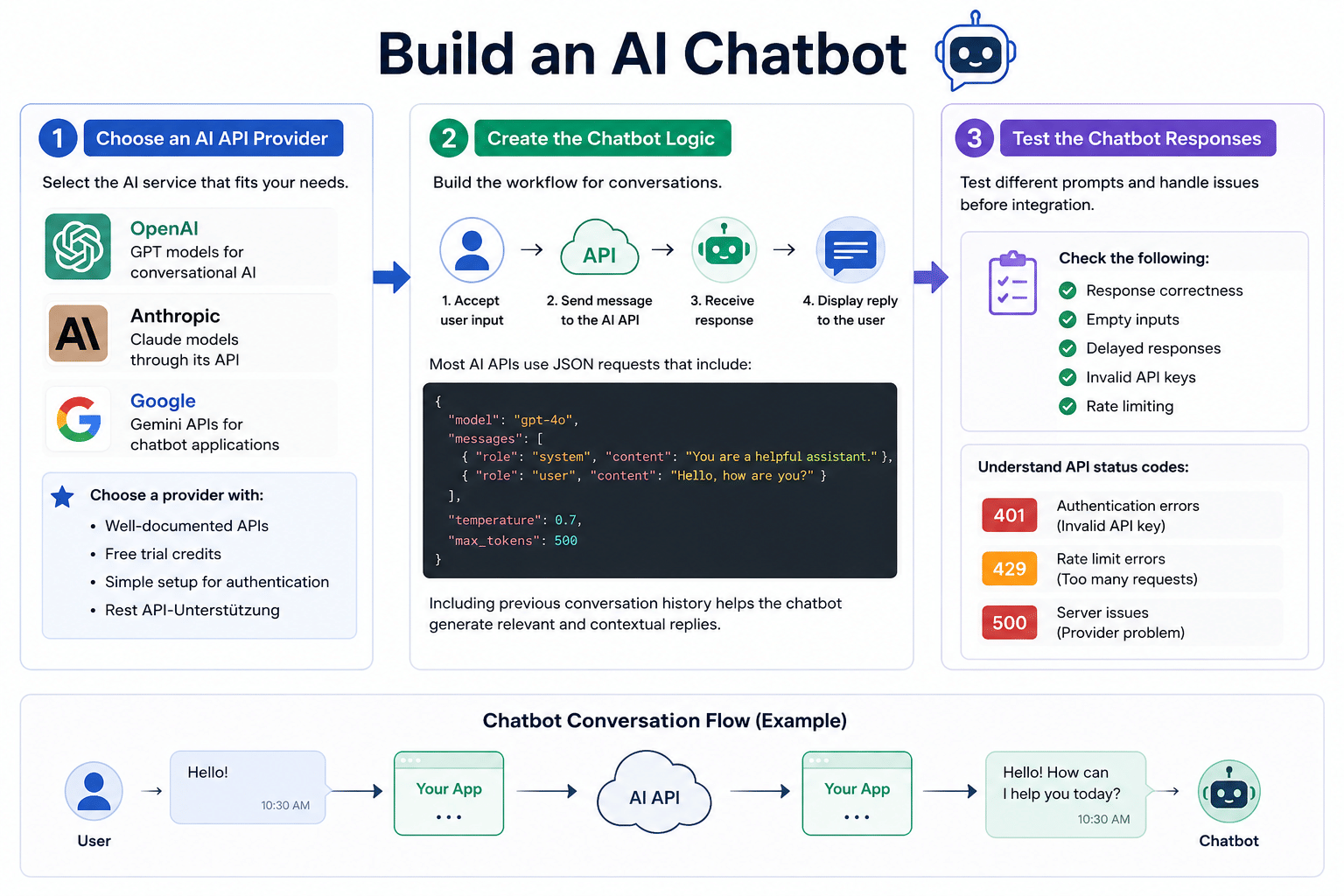
Here are the main steps for creating a chatbot using APIs.
Step 1: Choose an AI API Provider
Your first step is selecting the AI service you want to use. Different providers offer different pricing, request limits, and model capabilities.
For example:
- OpenAI API Documentation provides GPT models for conversational AI
- Anthropic provides Claude models through its API
- Google provides Gemini APIs for chatbot applications
If you’re creating your first chatbot, choose a provider with:
- Well-documented APIs
- Free trial credits
- Simple setup for authentication
- Rest API-Unterstützung
Step 2: Create the Chatbot Logic
The chatbot needs a basic workflow to handle conversations. Your application should:
- Accept user input
- Send the message to the AI API
- Receive the generated response
- Display the reply to the user
Most AI APIs use JSON requests that include:
- The user message
- The selected model
- Response settings
- Previous conversation history
This helps the chatbot generate relevant and contextual replies.
Step 3: Test the Chatbot Responses
Before moving to integration, test how the chatbot responds to different prompts.
You should check:
- Response correctness
- Empty inputs
- Delayed responses
- Invalid API keys
- Rate limiting
Most AI providers return status codes like:
- 401 for authentication errors
- 429 for rate limit errors
- 500 for server issues
Learn 29+ in-demand AI and machine learning skills and tools, including Generative AI, Agentic AI, Prompt Engineering, Conversational AI,ML Model Evaluation and Validation, andMachine Learning Algorithms with ourProfessional Certificate in AI and Machine Learning.
Integrating an AI Chatbot
After building the chatbot's logic, the next step is to integrate it into your application or platform. Integration allows users to access the chatbot through websites, mobile apps, messaging platforms, or internal business systems.
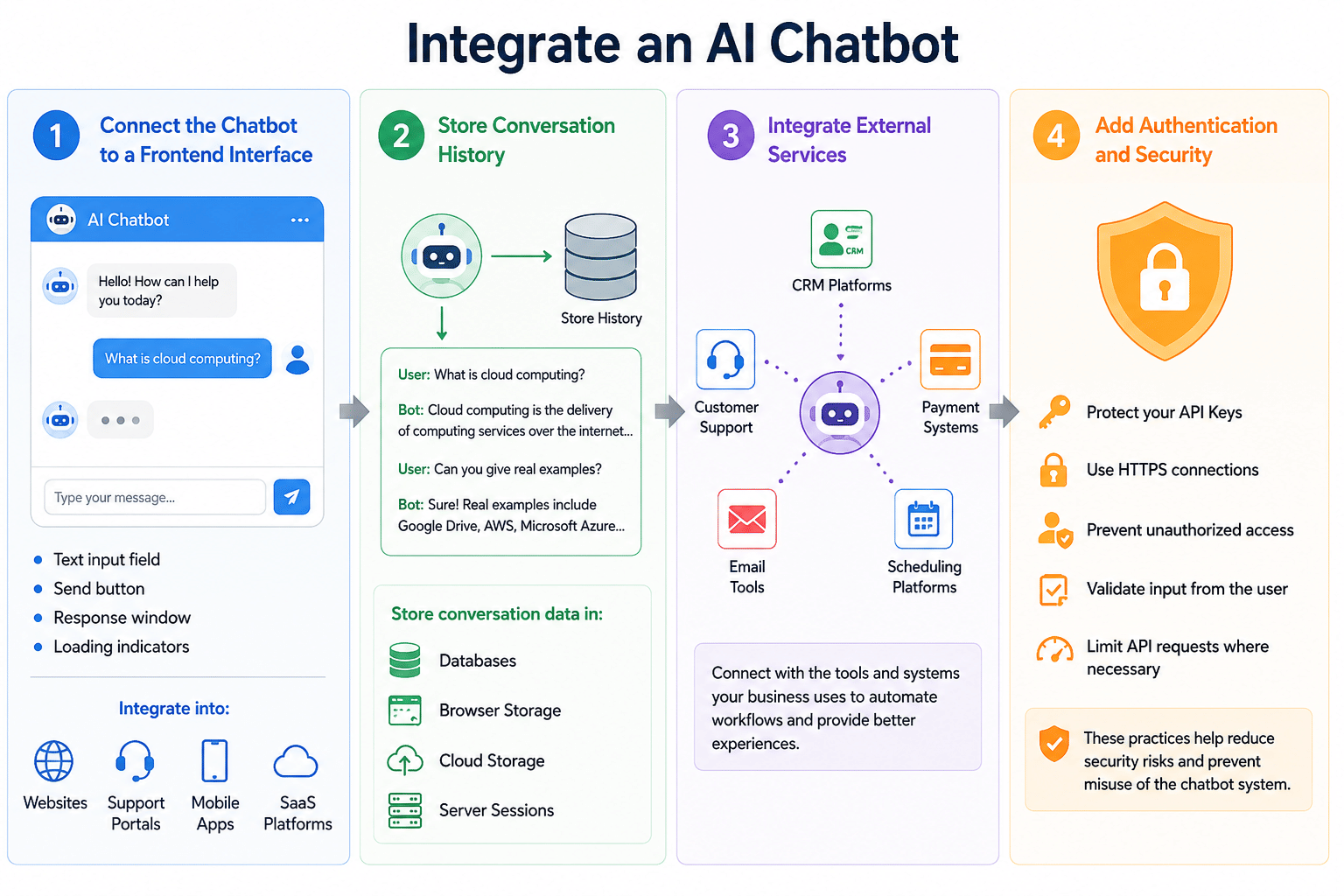
Here is how you can do that:
Step 1: Connect the Chatbot to a Frontend Interface
Your chatbot requires a user interface that lets people type messages and see responses.
The common elements of a basic chatbot interface are:
- A text input field
- A send button
- A response window
- Loading indicators
You can integrate the chatbot into:
- Business websites
- Customer support portals
- Mobile applications
- SaaS platforms
Step 2: Store Conversation History
For the chatbot to remember previous messages, you need to save the conversation history. Most AI APIs don’t store conversations between requests by default.
For example:
- A user asks, “What is cloud computing?”
- Then asks, “Can you give real examples?”
Without stored history, the chatbot may not correctly understand the second question.
You can store conversation data in:
- Databases
- Browser storage
- Cloud storage systems
- Server sessions
Step 3: Integrate External Services
Many chatbots integrate with external tools and business systems, like:
- CRM platforms
- Customer support software
- Payment systems
- Email tools
- Scheduling platforms
Step 4: Add Authentication and Security
If your chatbot handles customer accounts or sensitive data, you need proper security controls. You need to:
- Protect your API Keys
- Use HTTPS connections
- Prevent unauthorized access
- Validate input from the user
- Limit API requests where necessary
This helps reduce security risks and prevents misuse of the chatbot system.
Build real-world AI and Machine Learning skills with ourMicrosoft AI Engineer Course. Designed to match current industry needs, it helps you learn practical concepts and apply them with confidence. Start your journey today and take a clear step toward a future-ready career.
Deploying an AI Chatbot
Once the chatbot is tested and integrated, you can deploy it for public or internal use.
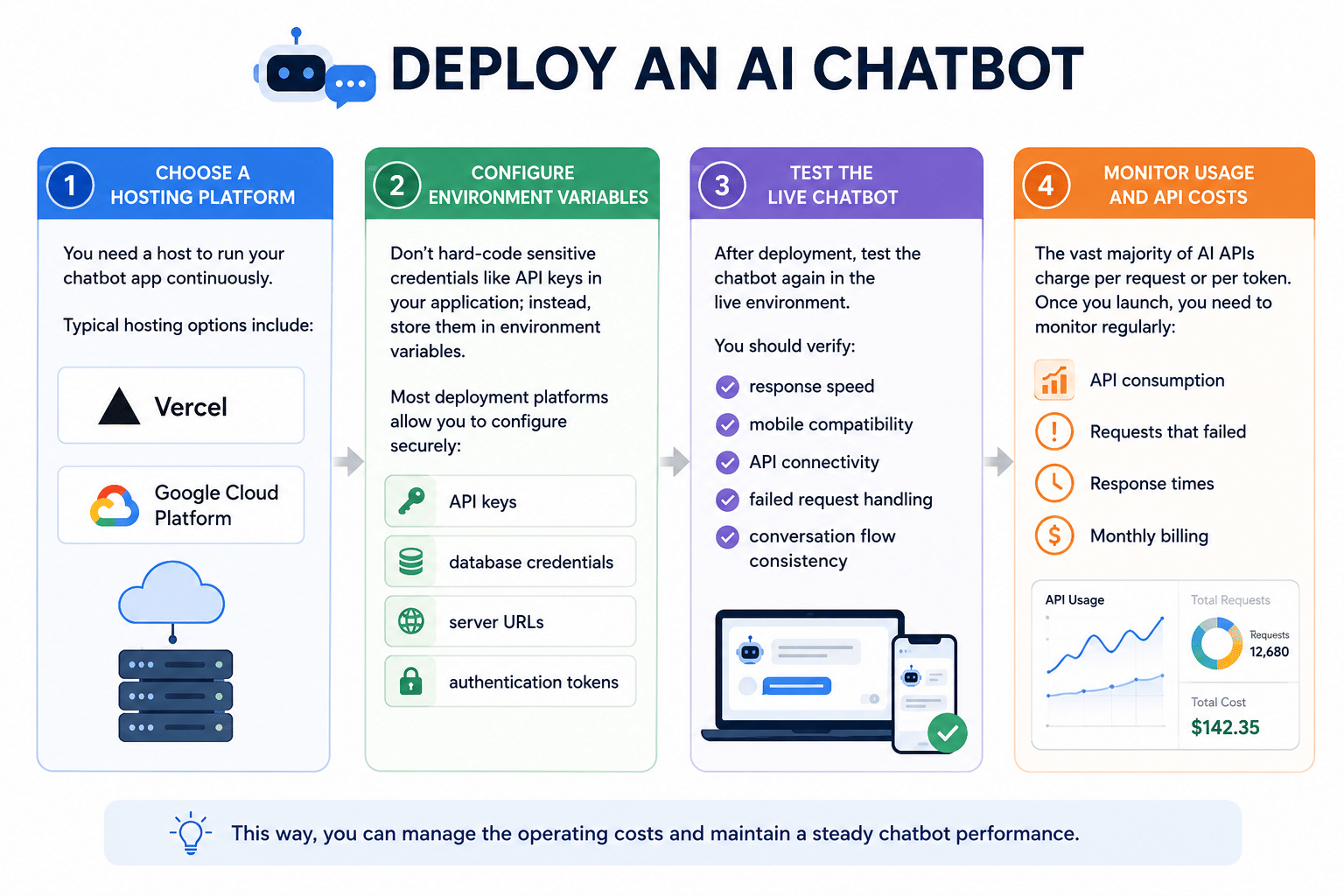
Here are the deployment steps:
Step 1: Choose a Hosting Platform
You need a host to run your chatbot app continuously.
Typical hosting options include:
- Vercel
- Google Cloud Platform
Step 2: Configure Environment Variables
Don’t hard-code sensitive credentials like API keys in your application; instead, store them in environment variables.
Most deployment platforms allow you to configure securely:
- API keys
- database credentials
- server URLs
- authentication tokens
Step 3: Test the Live Chatbot
After deployment, test the chatbot again in the live environment.
You should verify:
- response speed
- mobile compatibility
- API connectivity
- failed request handling
- conversation flow consistency
Step 4: Monitor Usage and API Costs
The vast majority of AI APIs charge per request or per token. Once you launch, you need to monitor regularly:
- API consumption
- Requests that failed
- Response times
- Monthly billing
- User Actions
This way, you can manage the operating costs and maintain a steady chatbot performance.
Did You Know?The global artificial intelligence market size is projected to grow from USD 294.16 billion in 2025 to USD 1,771.62 billion by 2032, exhibiting a CAGR of 29.20% during the forecast period. (Source:Fortune Business Insights)
Key Takeaways
- Creating a chatbot with APIs allows you to build conversational applications without training an AI model from scratch
- To create AI chatbot systems successfully, you need proper API setup, conversation handling, testing, and security controls
- Chatbot integration helps you connect the system with websites, mobile apps, CRM tools, and customer support platforms
- Deployment and monitoring are critical to keep the chatbot running, control the API costs, and handle the real user traffic
AI engineering starts where model building meets real-world systems. Follow this AI Engineer roadmap to understand deployment, evaluation, integration, monitoring, and the delivery of reliable AI.
Also Read:
FAQs
1. Can I create my own AI chatbot?
Yes, you can create your own AI chatbot using APIs like OpenAI or Gemini.
2. Are AI chatbots profitable?
Yes, many companies build an AI chatbot to automate customer support and cut costs.
3. Are AI chatbots illegal?
No, AI chatbots are legal if they follow privacy and data protection laws.
4. Is there a 100% free AI chatbot?
Yes, you can create an AI chatbot using free tools or open-source models with limited usage.