
Most ML engineers know what a feature store is. Almost none have built one. Here’s everything I learned doing it from scratch.
7 min read
23 hours ago
--
Press enter or click to view image in full size
There’s a question that comes up in almost every serious ML engineering interview:
“How do you ensure your training features match what you serve in production?”
Most candidates describe it at a high level. Fewer have actually solved it. I spent one week building a production-grade feature store from scratch to understand every layer and what I found changed how I think about ML systems entirely.
The GitHub repo is here: github.com/Emart29/ml-feature-store
The Problem: Training-Serving Skew
Before I explain what I built, let me explain the bug it prevents.
Imagine you train a heart disease classifier. Your training pipeline pulls patient features like age, cholesterol, heart rate from a database and joins them to labels. The model trains well. You deploy it. Months later, a cardiologist notices the predictions have degraded.
The root cause: your training data leaked future information.
Here’s how it happens. Your label for patient 42 has a diagnosis_date of January 31st. But your feature join pulled the latest cholesterol reading which might have been updated on February 3rd, after the diagnosis. The model learned from data it could never have seen at prediction time.
This is training-serving skew. It’s silent, it’s common, and it makes your model’s offline metrics completely untrustworthy.
The fix is point-in-time correct joins: when assembling training data, only use feature values that were known before the label’s timestamp. This is the core guarantee a feature store provides.
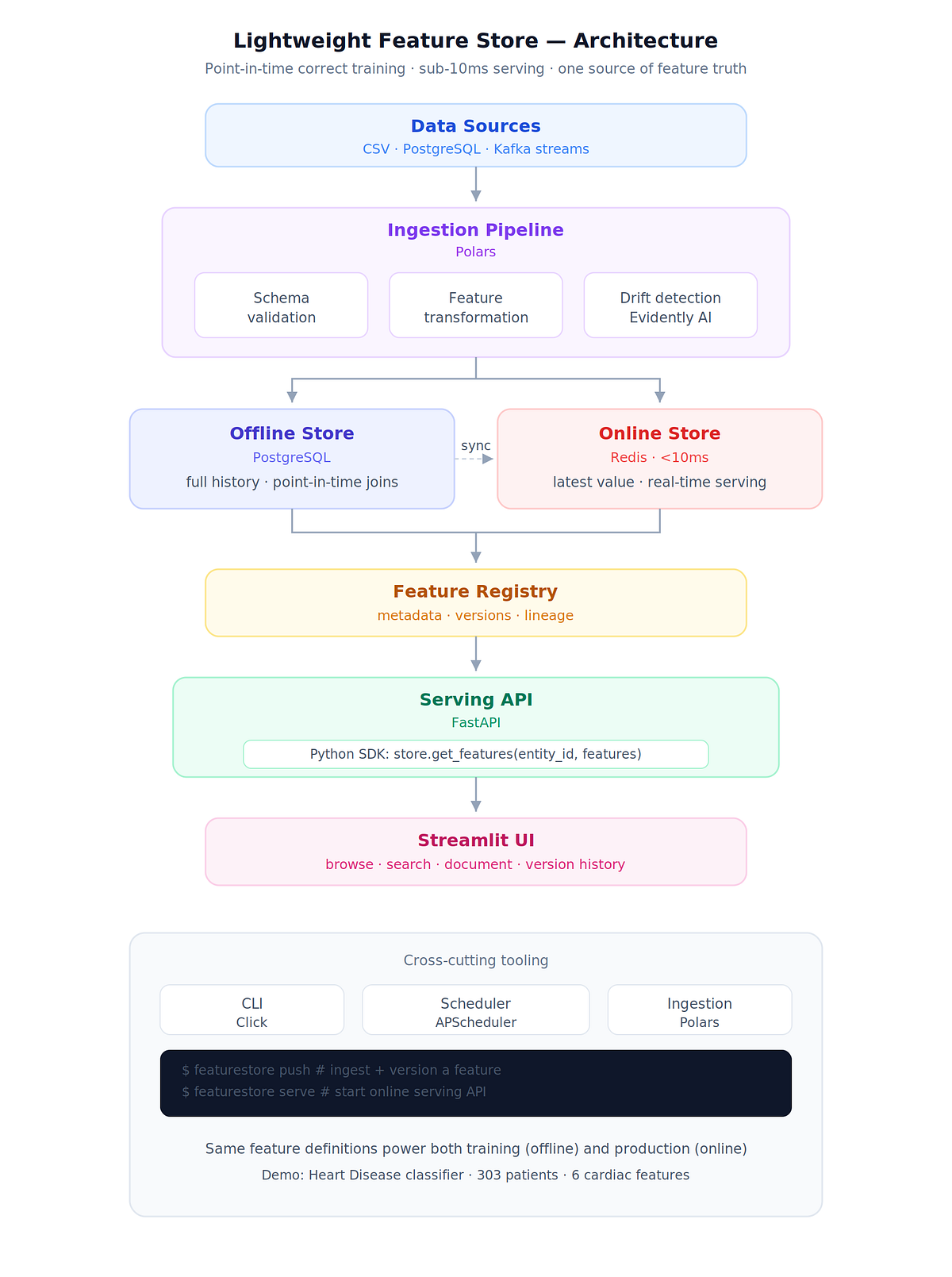
What I Built
Data Sources (CSV, PostgreSQL, Kafka)
         │
         ▼
Ingestion Pipeline (Polars)
    ├── Schema validation
    ├── Feature transforms  (@feature decorator)
    └── Drift detection     (Evidently AI)
         │
    ┌────┴────┐
    ▼         ▼
Offline Store   Online Store
(PostgreSQL)    (Redis, <10ms)
    │               │
    └──────┬─────────┘
           ▼
  Feature Registry (metadata, versions, lineage)
           │
           ▼
  Serving API (FastAPI)  ←  Python SDK
           │
           ▼
  Streamlit UI  (browse, search, version history, drift)
One Docker command spins up the entire system, ingests the Heart Disease demo dataset (303 patients, 6 features), and serves features at sub-10ms latency through Redis.
The @feature Decorator
The cleanest design decision in the whole project. Features are plain Python functions:
import polars as pl
from ingestion.transforms import feature@feature(
    name="composite_risk_score",
    entity_type="patient",
    data_type="float",
    description="Weighted combination of cardiac risk factors",
    owner="ml-team",
    tags=["cardiac", "risk", "composite"],
)
def composite_risk_score(df: pl.DataFrame) -> pl.DataFrame:
    age = pl.col("age").cast(pl.Float64)
    age_norm = (age - age.min()) / (age.max() - age.min())
    chol = pl.col("chol").cast(pl.Float64)
    chol_risk = pl.when(chol >= 240).then(1.0).when(chol >= 200).then(0.5).otherwise(0.0)
    oldpeak = pl.col("oldpeak").cast(pl.Float64)
    oldpeak_norm = (oldpeak / oldpeak.max()).fill_nan(0.0)    value = (
        0.25 * age_norm
        + 0.20 * chol_risk
        + 0.20 * pl.col("exang").cast(pl.Float64)
        + 0.20 * oldpeak_norm
        + 0.15 * (pl.col("ca").cast(pl.Float64) / 3.0)
    ).clip(0.0, 1.0)    return df.select([
        pl.col("patient_id").alias("entity_id"),
        value.alias("value"),
        pl.lit(None).cast(pl.Datetime("us", "UTC")).alias("computed_at"),
    ])
Two things happen automatically when this runs:
- The function body is SHA-256 hashed. If you change the weighting (
0.25→0.30) and re-run ingestion, a new version is created automatically. No manual version bumps. No "oh I forgot to update the version number" bugs. - The decorated function registers itself in a global
FeatureTransformRegistry. The ingestion pipeline discovers all features by scanning registered transforms — you never maintain a list.
You can then compare any two versions:
featurestore diff composite_risk_score 1 2This shows the code diff side-by-side with statistical changes — mean shifted from 0.38 to 0.41, p95 from 0.70 to 0.74. You can see exactly what changed and how it affected the distribution.
Point-in-Time Correct Joins
This is the feature that makes or breaks a feature store. Here’s the core SQL logic:
SELECT
    e.entity_id,
    e.timestamp,
    fv.value
FROM entity_timestamps e
LEFT JOIN LATERAL (
    SELECT value
    FROM feature_values
    WHERE feature_id = :feature_id
      AND entity_id = e.entity_id
      AND computed_at <= e.timestamp          -- only values known before label time
    ORDER BY computed_at DESC
    LIMIT 1
) fv ON true
The LATERAL join with computed_at <= e.timestamp is the key. For every entity-timestamp pair in your label set, it finds the most recent feature value that was computed before that timestamp.
In the Python SDK:
from sdk.client import FeatureStoreClient
import pandas as pdstore = FeatureStoreClient(url="http://localhost:8000")
labels_df = pd.DataFrame({
"patient_id": ["1", "2", "3"],
"diagnosis_date": ["2024-01-31T00:00:00Z"] * 3,
"target": [1, 0, 1],
})
train_df = store.get_historical_features(
entity_df=labels_df,
features=["age_normalized", "cholesterol_risk_score", "composite_risk_score"],
entity_column="patient_id",
timestamp_column="diagnosis_date",
entity_type="patient",
)
The result is a DataFrame with your original columns plus feature columns — guaranteed no future leakage, regardless of when those features were last updated.
Dual-Store Architecture: Why Both Matter
Most tutorials show either a training pipeline or a serving API. The hard part is making both work from the same feature definitions.
Offline store (PostgreSQL): Stores the full history of every feature value with timestamps. Used for point-in-time correct training data. Queryable by any time range. This is your source of truth.
Online store (Redis): Stores only the latest value per entity. Used for real-time serving. Optimised for single-entity lookups in under 10ms. This is your production serving layer.
Get EMMANUEL NWANGUMA’s stories in your inbox
Join Medium for free to get updates from this writer.
Remember me for faster sign in
A scheduled sync job (APScheduler, configurable interval) pushes new values from PostgreSQL to Redis
featurestore sync --full        # sync everything
featurestore sync --incremental # only since last watermark
featurestore sync --feature age_normalized  # one feature only
The result: your training pipeline and your production API read from the same feature definitions, just from different backing stores optimised for their access patterns. No separate feature engineering scripts. No drift between training and serving.
Drift Detection on Every Ingestion Run
Every time you push new data, Evidently AI automatically compares the new distribution against the reference (the first ingestion). You get a structured drift report without writing any evaluation code:
from ingestion.pipeline import FeatureIngestionPipelinepipeline = FeatureIngestionPipeline()
result = await pipeline.run(
feature_name="age_normalized",
source_config={"type": "csv", "path": "data/heart.csv"},
)
print(result.drift_detected) # True / False
print(result.drift_score) # 0.0 – 1.0
print(result.records_processed) # 303
The drift history is queryable through both the CLI (featurestore stats age_normalized) and the Streamlit UI, where you can see a timeline of drift scores across ingestion runs.
The Streamlit Registry
The registry browser is where you spend most of your time as a feature author. Five pages:
- Feature Registry — browse all features, filter by entity type, status, or tag, see statistics at a glance
- Feature Detail — full metadata, owner, tags, version history with SHA-256 hashes, latest distribution statistics
- Version Diff — side-by-side code diff between any two versions with statistical comparison
- Drift History — timeline of drift scores, mark runs as reference baseline
- Ingestion Runs — full audit log of every pipeline run with duration, record count, success/failure
No more “what does this feature actually do?” or “who owns this?” questions in code review.
What I Actually Learned Building This
1. Asyncio + SQLAlchemy + asyncpg has a hidden footgun.
If you create a SQLAlchemy async engine at module import time with a connection pool, and then use it inside a Uvicorn lifespan handler, you get:
RuntimeError: Task got Future attached to a different loopThe pool binds to the event loop that’s active when it’s first used. Uvicorn creates its own event loop. Fix: use NullPool. Each request creates and closes its own connection tho its slightly slower, but no cross-loop state.
from sqlalchemy.pool import NullPoolengine = create_async_engine(settings.POSTGRES_URL, poolclass=NullPool)
2. Docker build context size kills iteration speed.
Without .dockerignore, my first build sent 500MB+ to the Docker daemon (the entire .venv/ was included). Build "started" but sat doing nothing for 8 minutes. Add this to .dockerignore immediately:
.venv/
venv/
__pycache__/
*.py[cod]
*.egg-info/
.git/
.env
mlruns/
*.pkl
*.csv
3. Docker DNS fails silently during long pip installs.
When pip is installing a large dependency tree inside a Docker container on Windows, DNS resolution can drop after 60–90 seconds. You get [Errno -2] Name or service not known mid-install.
Fix: add --timeout=300 --retries=10 to your pip install command in the Dockerfile:
RUN pip install --no-cache-dir --timeout=300 --retries=10 -r requirements.txt4. Point-in-time correctness is harder than it looks.
The SQL pattern seems simple until you think about edge cases: what if an entity has no feature value before the label timestamp? (Use LEFT JOIN LATERAL, return null.) What if the same feature has multiple values on the same timestamp? (Add a secondary sort by ingestion_run_id DESC.) What about time zones? (Store everything UTC, convert at the API layer.)
Each of these took a debugging session to find.
Running It
# Clone the shared infrastructure (PostgreSQL, Redis, MinIO, Kafka, Prometheus)
git clone https://github.com/Emart29/ml-platform-infra
cd ml-platform-infra && docker compose up -d && cd ..# Clone and start the feature store
git clone https://github.com/Emart29/ml-feature-store
cd ml-feature-store
docker compose up
Open http://localhost:8501 — the Streamlit registry is live with 6 cardiac features and statistics from 303 patients.
The full API is at http://localhost:8000/docs
Why This Belongs in an ML Portfolio
Feature stores appear at every serious ML company — Uber (Michelangelo), Airbnb (Zipline), LinkedIn (Feast), Spotify, Twitter. The interview question is always a variation of: “How do you prevent training-serving skew at scale?”
Most portfolios answer with a sentence. This answers with a running system.
The components it covers — dual-store architecture, point-in-time joins, feature versioning, drift detection, async serving, scheduled sync — are the building blocks of production ML infrastructure. Understanding all of them at the code level changes what questions you ask and what tradeoffs you notice when you work with mature systems.
This is Project 1 of 15 in my applied ML engineering portfolio. Project 2 is a Data Versioning and Pipeline Lineage Tracker — trace any prediction back to the exact raw data that produced it.