
A practical look at debugging the evidence chain in RAG systems: retrieval, context selection, answer claims, citation support, and local failure reports.
6 min read
11 hours ago
--
RAG systems often fail in a way that is hard to see.
The answer looks reasonable. The citations look official. The retrieved chunks look vaguely related.
Then a user asks a question where the model combines one supported fact with one invented detail, and nobody notices until the answer is wrong in production.
That failure mode is what I wanted to debug better.
I built ContextTrace, a local-first Python SDK and CLI for tracing RAG and agent applications. The goal is not to replace eval frameworks or observability platforms. The goal is narrower:
> Show the failure path from retrieved evidence to selected context to answer the claim to citation support.
I made it local-first because RAG traces often contain private documents, retrieved chunks, customer data, or internal policies.
GitHub: https://github.com/samarth1412/Context-Trace
PyPI: https://pypi.org/project/contexttrace/
The Problem: RAG Answers Can Look Grounded While Being Unsupported
A typical RAG pipeline has a few steps:
user query
-> retrieval
-> context selection
-> answer generation
-> citations
When something goes wrong, we usually see only the final answer.
But the real failure may have happened earlier:
retrieved weak evidence
-> selected incomplete context
-> generated unsupported claim
-> cited the wrong source
-> returned a plausible answer
The dangerous part is that the answer may still look grounded.
For example:
Query:
How long does refund processing take?Retrieved source chunk:
Customers may request a refund within 30 days of purchase.Bad RAG answer:
Customers can request refunds within 30 days,
and refunds are processed within 5 business days.
The first part is supported. The second part is not.
A normal user may not catch that. A basic citation display may not catch that either. The answer cites a refund policy, and the answer is about refunds, so it looks fine.
But at the claim level, the citation does not support the processing-time claim.
That is the kind of silent failure ContextTrace is designed to expose.
Press enter or click to view image in full size
Why Scores Alone Are Not Enough
RAG evaluation tools are useful. Aggregate scores matter.
But when an eval says:
faithfulness: 0.72
citation support: 0.65
The next question is:
What broke?
Was it retrieval? Was it chunking? Was the selected context incomplete? Did the model ignore the context? Did the citation point to the wrong source? Should the system have abstained?
Scores are good for tracking quality over time. They are less useful when you are trying to debug one bad answer.
For debugging, I wanted the report to say something more concrete:
Claim 1: directly_supported
Claim 2: unsupported
Failure type: unsupported_answerRoot cause:
The answer added a processing-time claim that was not present in the retrieved evidence.
Suggested fix:
Require sentence-level citation support before returning the final answer.
That is the core idea behind ContextTrace.
What ContextTrace Does
ContextTrace records the parts of a RAG pipeline that usually disappear after the response is returned: query, retrieved chunks, selected context, answer, citations, token usage, latency, metadata, and agent/tool events.
It works through SDK instrumentation, a CLI for existing RAG endpoints, and integrations for LangChain, LlamaIndex, FastAPI, and LangGraph.
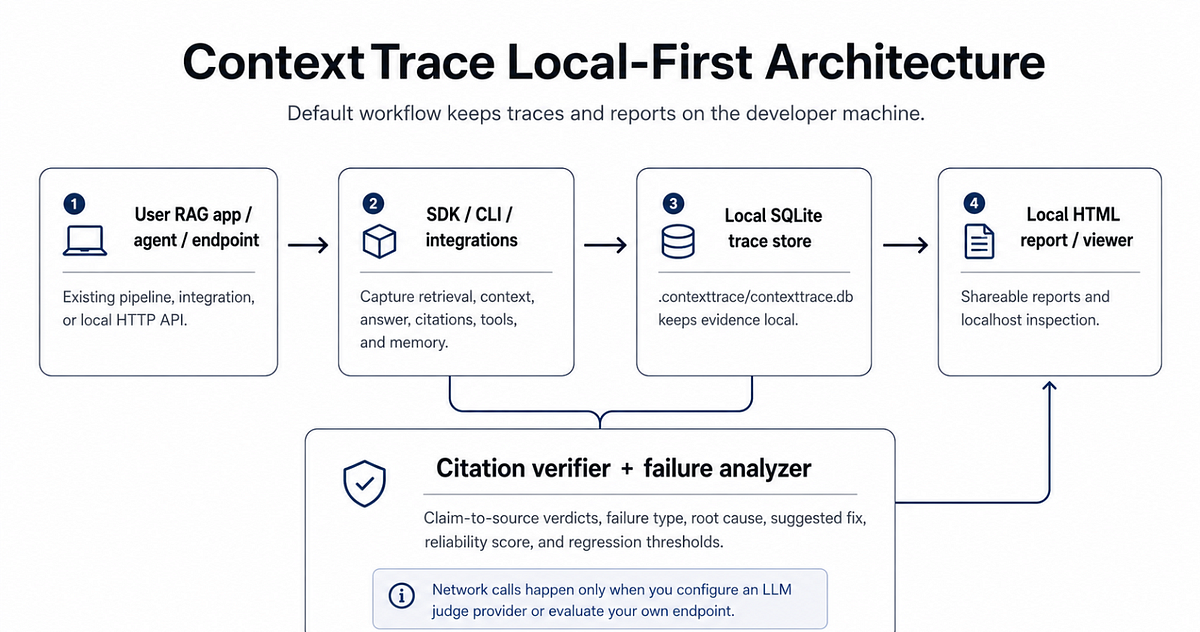
The architecture is intentionally boring:
User RAG app / agent / endpoint
-> SDK / CLI / integrations
-> local SQLite trace store
-> citation verifier + failure analyzer
-> local HTML report / viewer
The hard part is not orchestration. It is making the evidence chain inspectable.
SDK
The SDK wraps an existing RAG flow:
from contexttrace import ContextTracect = ContextTrace(project="support-rag")
with ct.trace(query="What is the refund policy?") as trace:
chunks = retriever.search("What is the refund policy?")
trace.log_retrieval(chunks)
trace.log_context(chunks[:5])
answer = llm.generate("What is the refund policy?", chunks[:5])
trace.log_answer(answer, usage={"total_tokens": 1200})
trace.log_citations([
{
"claim": "Refunds are available within 30 days.",
"source_chunk_id": "chunk_12"}])
result = trace.evaluate()
print(result["failure"]["failure_type"])
print(result["failure"]["suggested_fix"])
Local Evaluation
ContextTrace checks whether an answer claim is supported by its cited source chunk.
Citation verdicts include `directly_supported`, `partially_supported`, `unsupported`, `contradicted`, and `not_enough_info`.
Failure labels include `retrieval_miss`, `citation_mismatch`, `unsupported_answer`, `conflicting_sources`, `should_have_abstained`, and `query_needs_decomposition`.
The labels are not meant to be perfect. They are meant to make debugging more concrete than “the answer was bad.”
Demo: Refund Policy Failure
Here is the canonical example.
Query:
How long does refund processing take?Source chunk:
Customers may request a refund within 30 days of purchase.Bad answer:
Customers can request refunds within 30 days, and refunds are processed within 5 business days.ContextTrace evaluates the claims separately:
Claim 1: Customers can request refunds within 30 days.
Verdict: directly_supportedClaim 2: Refunds are processed within 5 business days.
Verdict: unsupported
Then it gives a diagnosis:
Failure type: unsupported_answerRoot cause: The answer added a processing-time claim that was not present in the retrieved evidence.
Suggested fix: Require sentence-level citation support before returning the final answer.
This is the difference between a score and a failure path.
Get Samarth vinayaka’s stories in your inbox
Join Medium for free to get updates from this writer.
Remember me for faster sign in
What the Report Shows
A local report summarizes the reliability score, failure rate, citation support, unsupported claims, worst traces, root cause, and suggested fixes.
Example:
Reliability score: 72/100
Failure rate: 0.30
Citation support: 0.81
Worst trace:
Failure: unsupported_answer
Root cause: The model added a processing-time claim that was not present in the retrieved evidence.
Suggested fix: Require sentence-level citation support before returning the answer.
Running It From PyPI
Install:
pip install contexttraceRun the demo:
contexttrace init
contexttrace demo - dataset refund_policy
contexttrace report - last - open
This creates a local trace database and opens an HTML report.
Press enter or click to view image in full size
You can also inspect the status:
contexttrace doctorOr list traces:
contexttrace traces listTesting Your Own RAG API
You do not have to install the SDK into your application.
If you already have a RAG endpoint like:
POST http://localhost:8000/queryYou can run ContextTrace against it:
contexttrace eval \
 - dataset evals/questions.json \
 - endpoint http://localhost:8000/query \
 - method POST \
 - input-key question \
 - answer-path $.answer \
 - contexts-path $.contexts \
 - citations-path $.citations \
 - fail-on "failure_rate>0.25"
Expected response shape:
{
"answer": "Refunds are available within 30 days.",
"contexts": [
{
"id": "refund_policy_1",
"text": "Customers may request a refund within 30 days of purchase.",
"source": "refund_policy.md"
}
],
"citations": [
{
"claim": "Refunds are available within 30 days.",
"source_chunk_id": "refund_policy_1" } ] }
ContextTrace maps the response, creates local traces, evaluates the result, and writes a report.
This is useful if you want to test a RAG service without modifying the code first. The same CLI can also be used in CI with thresholds such as failure_rate>0.25 or citation_support<0.80.
Local-First Privacy
Many RAG debugging tools assume you are comfortable sending traces somewhere.
For many teams, that is not the default assumption.
RAG traces can include private documents, customer support content, legal text, internal policies, retrieved chunks, final answers, tool outputs, and memory reads.
ContextTrace defaults to local storage.
By default:
No hosted dashboard is required.
No account is required.
Traces are stored in .contexttrace/contexttrace.db.
Reports are generated locally.
Network calls happen only if you configure an LLM judge provider or point ContextTrace at a RAG endpoint.
Where This Fits
ContextTrace is not meant to replace broader tools.
It complements them.
Press enter or click to view image in full size
If you already use one of those tools, ContextTrace can still be useful as a local debugging layer.
Limitations
This is v0.1.0.
Some important caveats:
- ContextTrace is diagnostic. It does not guarantee correctness.
- LLM judge outputs should be reviewed for high-stakes workflows.
- Local heuristic evaluation is intentionally simple.
- Failure labels are meant to guide debugging, not replace human review.
- The local viewer and reports will improve over time.
- Agent tracing is early and intentionally basic.
I would not use this as the only quality gate for a high-stakes production system.
I would use it to find failure patterns faster.
Who This Is For
ContextTrace is most useful if you already have a RAG or agent system and want to debug it locally. It is not a RAG builder. It is meant for:
- RAG APIs
- support bots
- internal knowledge assistants
- policy/document QA systems
- agent workflows that use retrieval or memory
- teams adding CI checks for prompt/retrieval changes
I am especially looking for feedback on:
- whether the failure labels are useful
- whether the CLI workflow is simple enough
- What fields are missing from the trace/report
- What integrations matter most
GitHub: https://github.com/samarth1412/Context-Trace
PyPI: https://pypi.org/project/contexttrace/
Release: https://github.com/samarth1412/Context-Trace/releases/tag/v0.1.0
If you are building RAG systems and have feedback, I'd like to hear what breaks.